Talk Forward brings a VoiceOver-style screen reader to Android
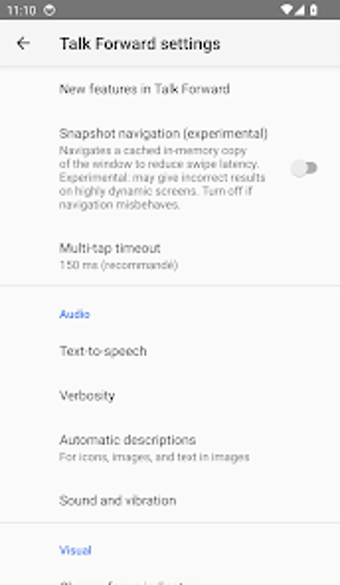
Experience a faster, gesture-focused screen reader with Talk Forward, by Yannick PLASSIARD, designed to make Android navigation easier for blind users. The app provides a VoiceOver-style interaction model that uses one-finger swipes and a rotor to move through content, control speech rate, and adjust punctuation. It bundles a six- and eight-dot braille keyboard, hold-to-dictate, on-device translation, and automatic image descriptions. Target users include blind and low-vision people, accessibility researchers, and those transitioning from iOS who prefer familiar touch controls.
How does the app change navigation on Android?
The app adopts an iOS-inspired gesture model, replacing complex angle gestures with one-finger swipes and a rotor for navigation granularity and speech settings. Practical results include quicker item-by-item movement and a Voice Rotor that switches voice engine, pitch, and volume. Key on-device features include:
- Built-in 6- and 8-dot braille keyboard with typing and command modes
- Hold-to-dictate that mutes speech while recording
- Automatic image descriptions for unlabeled controls
Does it slow down your system during a scan or use?
The developer built the app for low-latency feedback and high responsiveness, so typical interaction focuses on fast speech and quick rotor changes rather than heavy background processing. The app requires Accessibility Service permissions to operate, and it is optimized for both smartphones and tablets. On-device translation reduces network round trips, which helps responsiveness during live text focus and reading tasks.
Is it safe to use and what permissions does it need?
The app requires Accessibility Service permissions to read and navigate the UI, a standard requirement for screen readers. Privacy-focused functions run locally, for example on-device translation that avoids sending focused text to remote servers. The hold-to-dictate mode intentionally silences the screen reader during speech input, reducing accidental feedback loops while committing dictated text when the finger is lifted.
Do I need technical knowledge to operate the app correctly?
The app aims to lower the learning curve by using a rotor model familiar to VoiceOver users, so people moving from iOS find a shorter onboarding path. Nevertheless, deep gesture customization, two-finger gesture reassignment, and braille keyboard command modes offer advanced options for experienced users. Casual users can use default swipes; power users can remap edge swipes and two-finger actions to system navigation functions.
The app suits users seeking a responsive, VoiceOver-style screen reader
The app is a practical option for blind and low-vision users who need a responsive, VoiceOver-style interaction on Android. Trade-off: the different gesture model departs from standard Android conventions, so users comfortable with existing screen readers may require an adjustment period. The app favors fast on-device feedback and privacy-minded processing, though adaptation is needed for long-time Android screen reader users.